Tag: windows 12 rumors

  • Windows 12 Release Date and Latest News

    Windows 12 Release Date and Latest News

    The anticipation around Windows 12 is steadily growing, and it is easy to see why. Every time Microsoft hints at the future of Windows, users start asking the same question: when is Windows 12 actually coming out, and what will it bring?

    While Microsoft has not officially confirmed everything yet, there is already a mix of reliable leaks, insider discussions, and industry predictions that give us a fairly clear picture. If you are someone who follows tech updates closely or just wants to know whether it is worth waiting for the next Windows version, this guide breaks it all down in a simple and practical way.

    Is Windows 12 Officially Confirmed

    Windows 12

    Microsoft has not made a full formal announcement labeled as Windows 12, but there are strong signals that a next generation Windows system is in development. Over the past couple of years, Microsoft has shifted to a more flexible update cycle instead of sticking strictly to the old version numbering system.

    However, references to a future version of Windows have been spotted in developer builds, internal presentations, and partner discussions. Industry experts widely believe that Windows 12 is real and already in active development.

    In simple terms, even if Microsoft has not used the exact name publicly, the next major upgrade is definitely coming.

    Expected Windows 12 Release Date

    If you are hoping for a confirmed date, there is none yet. But based on patterns and insider reports, we can make a realistic estimate.

    Microsoft released Windows 11 in October 2021. Historically, major Windows versions used to arrive every three to six years. Following that pattern, many experts expect Windows 12 to launch sometime in late 2025 or early 2026.

    Some leaks also suggest that Microsoft is targeting a release window aligned with new hardware cycles, especially AI powered PCs. That could push the release closer to the second half of 2025.

    So while nothing is officially locked in, a late 2025 release remains the most widely accepted expectation.

    Why Windows 12 Might Be a Big Upgrade

    Windows 11 brought a visual redesign and performance improvements, but Windows 12 is expected to go much further. This is not just another update. It may represent a shift in how the operating system works.

    One of the biggest reasons is Microsoft’s growing focus on artificial intelligence. The company is investing heavily in AI tools across its ecosystem, and Windows 12 is likely to be built with AI at its core.

    Instead of just being a platform that runs software, Windows may become a system that actively helps you work smarter.

    AI Integration Will Be the Centerpiece

    If there is one feature that defines Windows 12, it is AI.

    Microsoft has already introduced AI features like Copilot in Windows 11, but Windows 12 is expected to take things much further. Imagine an operating system that understands your habits, predicts your needs, and automates repetitive tasks without you asking.

    For example, Windows 12 could organize your files based on how you use them, suggest actions depending on your workflow, and even adjust system settings automatically for better performance.

    This is not just speculation. Microsoft has clearly stated its goal to integrate AI deeply into Windows, and upcoming hardware from major manufacturers is already being designed with AI acceleration in mind.

    New User Interface and Design Changes

    Every new version of Windows brings some design changes, and Windows 12 will likely continue that trend.

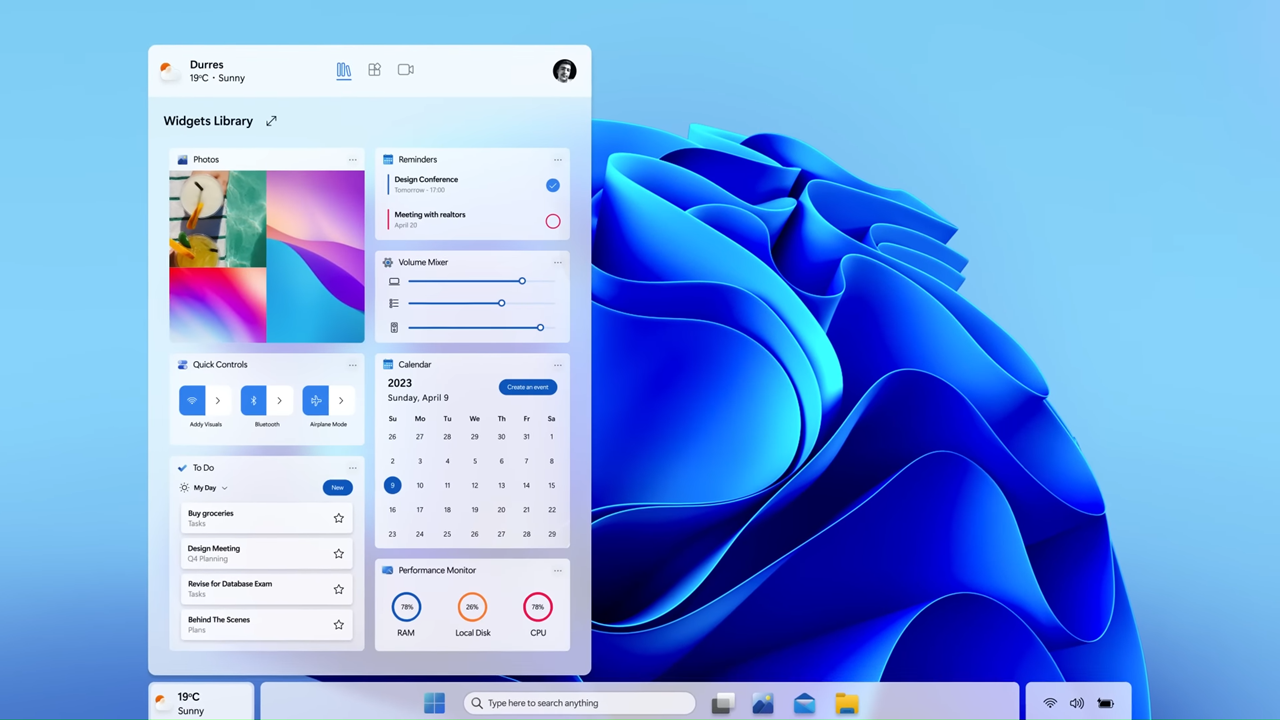
    Leaked concepts suggest a more modular and flexible interface. You might see floating taskbars, dynamic widgets, and a cleaner desktop experience that adapts to different devices.

    There are also hints of a more web integrated interface, where parts of the system can update independently without requiring full system updates. This could make Windows feel faster and more modern.

    For users, this means less clutter and more personalization.

    Improved Performance and Efficiency

    Performance is always a major focus, and Windows 12 is expected to improve both speed and efficiency.

    One of the key goals is better resource management. The system may use AI to allocate CPU and memory based on your usage patterns. That means smoother multitasking and fewer slowdowns.

    Battery life improvements are also expected, especially for laptops. With smarter power management, Windows 12 could help devices last longer on a single charge.

    For gamers and professionals, this could translate into a noticeable upgrade in day to day performance.

    Better Support for New Hardware

    Windows 12 is being designed with future hardware in mind. This includes support for new processors, improved GPU performance, and better compatibility with advanced devices.

    One major trend is the rise of AI focused chips. Companies like Intel, AMD, and Qualcomm are already working on processors with dedicated AI engines. Windows 12 will likely take full advantage of these capabilities.

    This also means that older devices may not support all features, so upgrading hardware might be necessary to experience everything Windows 12 offers.

    Cloud Integration and Smart Features

    Another area where Windows 12 is expected to improve is cloud integration.

    Microsoft is pushing services like OneDrive, Azure, and Microsoft 365, and Windows 12 will likely connect more deeply with these platforms. This could make file access, backups, and collaboration easier than ever.

    Imagine starting a task on one device and continuing it seamlessly on another without manually transferring files. That is the kind of experience Microsoft is aiming for.

    Security Enhancements

    Security is becoming more important with every passing year, and Windows 12 will likely introduce stronger protections.

    Expect improvements in areas like data encryption, identity protection, and threat detection. AI may also play a role here by identifying unusual activity and stopping threats before they cause damage.

    With cyber threats evolving constantly, these upgrades will be essential for both personal and professional users.

    Will Windows 12 Be a Free Upgrade

    This is one of the most common questions. While there is no official confirmation yet, Microsoft allowed free upgrades from Windows 10 to Windows 11 for many users.

    There is a good chance that Windows 12 will follow a similar model, at least for compatible devices. However, certain features may be limited to newer hardware.

    If you are already using Windows 11, you may not need to pay for the upgrade, but it will depend on Microsoft’s final strategy.

    Should You Wait for Windows 12

    This depends on your current situation.

    If your system is running well on Windows 11, there is no urgent need to upgrade immediately. Windows 11 will continue receiving updates and support for several years.

    However, if you are planning to buy a new PC, it might be worth waiting to see what Windows 12 offers. New devices will likely be optimized for the upcoming system, especially when it comes to AI features.

    In short, there is no wrong choice, but timing your upgrade can help you get the most value.

    Latest News and Industry Insights

    Recent discussions in the tech community suggest that Microsoft is accelerating its AI plans. Partnerships with hardware manufacturers and increased investment in cloud infrastructure are strong indicators that Windows 12 Iso will focus heavily on intelligent computing.

    There are also reports that Microsoft is experimenting with a more modular version of Windows, which could allow faster updates and better customization.

    While not all leaks turn out to be accurate, the overall direction is clear. Windows is evolving into a smarter, more adaptive platform.

    Final Thoughts

    Windows 12 is shaping up to be more than just the next version of an operating system. It represents a shift toward a more intelligent and connected computing experience.

    From AI powered features to improved performance and deeper cloud integration, there is a lot to look forward to. While the exact release date is still uncertain, the signs point to a launch in the near future.

    For now, the best approach is to stay informed and keep an eye on official announcements. Whether you are a casual user or a tech enthusiast, Windows 12 is definitely something worth watching.
  • Windows 12 UI Leaks and New Design Explained

    Windows 12 UI Leaks and New Design Explained

    The idea of Windows 12 has been quietly building momentum for a while now. Even though Microsoft has not officially revealed everything, leaks, insider reports, and early previews are already giving us a surprisingly clear picture of what is coming next. And if these glimpses are anything to go by, Windows 12 is not just another update. It looks like a complete rethink of how the Windows experience should feel in a modern world.

    If you have used Windows 10 or even Windows 11, you might remember how each version tried to modernize the interface while keeping familiar elements intact. Windows 12 appears to go further. It is shaping up to be cleaner, more adaptive, and heavily influenced by AI-driven interactions.

    Let’s break down everything we know so far about Windows 12 UI leaks and what they actually mean for everyday users.

    A Fresh Look That Feels Familiar

    One of the most talked-about leaks shows a redesigned desktop layout that looks noticeably different from anything we have seen before. Instead of the traditional layout where everything is anchored to the bottom, Windows 12 appears to experiment with a more flexible design.

    In some leaked screenshots, the taskbar is floating slightly above the bottom edge, giving the interface a lighter and more modern feel. The system tray is separated and positioned at the top corner in certain builds, which might remind some users of macOS or even ChromeOS.

    At first glance, this might seem like a drastic change. But when you look closer, it is still very much Windows. The Start menu, icons, and navigation patterns are still intuitive. Microsoft seems to be walking a careful line between innovation and familiarity.

    Floating Taskbar and Modular Layout

    The floating taskbar is not just a visual tweak. It represents a broader shift toward modular UI design. This means different parts of the interface can move, adapt, or even disappear depending on what you are doing.

    For example, when working in full-screen apps or focusing on productivity tasks, the interface may minimize distractions by hiding certain elements. On the other hand, when you are browsing or multitasking, those same elements can reappear in a more accessible way.

    This kind of flexibility could make Windows feel less cluttered and more responsive to user behavior.

    Smarter Widgets and AI Integration

    One of the most exciting aspects of Windows 12 UI leaks is the deeper integration of AI. Widgets are expected to become far more intelligent and context-aware.

    Instead of static information panels, future widgets might adapt based on your habits. For instance, if you regularly check the weather in the morning or track stock prices during work hours, the system could automatically highlight those widgets at the right time.

    AI could also play a role in organizing your desktop, suggesting app layouts, or even optimizing system performance based on how you use your computer.

    This is not just about convenience. It is about making the operating system feel like it understands you.

    A Cleaner, Minimalist Design Language

    Windows 11 introduced rounded corners, softer shadows, and a more polished design. Windows 12 seems ready to refine that approach even further.

    Leaked visuals suggest:

    • More transparency effects that feel subtle rather than overwhelming
    • Smoother animations that make transitions feel natural
    • Simplified icons with consistent styling
    • Reduced visual clutter across menus and settings

    The overall goal appears to be clarity. Instead of overwhelming users with too many visual elements, Windows 12 aims to present information in a calm and structured way.

    This might not sound revolutionary, but in daily use, these small changes can make a big difference.

    Redesigned Start Menu Experience

    The Start menu has always been the heart of Windows, and it looks like Microsoft is rethinking it once again.

    Early leaks suggest a more dynamic Start menu that could include:

    • Personalized recommendations based on usage
    • Better organization of apps and files
    • Integration with cloud services for quick access
    • Adaptive layout depending on screen size and device type

    For users who rely heavily on the Start menu, this could make navigation faster and more intuitive.

    Better Multi Device Experience

    Windows 12 is expected to focus heavily on seamless experiences across devices. Whether you are switching between a laptop, tablet, or even a foldable device, the UI is rumored to adapt automatically.

    This includes:

    • Layout changes based on screen size
    • Touch-friendly controls when needed
    • Smooth transitions between keyboard and touch input

    This adaptability is especially important as more users move between different types of devices throughout the day.

    Enhanced Snap Layouts and Multitasking

    Multitasking has always been one of Windows’ strongest features, and Windows 12 Download looks ready to take it further.

    Leaked features suggest improvements like:

    • More customizable snap layouts
    • AI-assisted window placement
    • Faster switching between tasks
    • Better support for multiple monitors

    Imagine opening a set of apps and having Windows automatically arrange them in the most efficient way. That is the kind of experience Microsoft seems to be aiming for.

    Performance Focus Behind the Scenes

    While the UI changes are getting most of the attention, there is also a strong focus on performance improvements.

    Reports suggest that Windows 12 may use a more modular system architecture. This could allow for:

    • Faster updates
    • Better security
    • Improved performance on both high-end and low-end devices

    For users, this means a smoother experience without needing constant hardware upgrades.

    Cloud and Web Integration

    Another noticeable trend in Windows 12 leaks is deeper integration with cloud services. Microsoft appears to be pushing toward a more connected ecosystem.

    This could include:

    • Faster syncing of files and settings
    • Better integration with Microsoft 365 apps
    • Web-based features that reduce dependency on local storage

    While this might raise concerns for some users, it also opens up possibilities for more flexible and accessible computing.

    What These Leaks Really Mean

    It is important to remember that leaks are not final. Features can change, designs can evolve, and some ideas may never make it to the final release.

    However, the overall direction is clear. Microsoft is moving toward a smarter, cleaner, and more adaptive operating system.

    Instead of focusing only on visual upgrades, Windows 12 seems to prioritize how users interact with their devices on a daily basis.

    Should You Be Excited About Windows 12

    If you enjoy trying new features and staying up to date with technology, Windows 12 is definitely something to watch. The combination of AI integration, modern design, and improved performance could make it one of the most significant Windows releases in years.

    At the same time, if you prefer stability and familiarity, it might be worth waiting until the official release and early updates settle things down.

    Either way, the changes coming with Windows 12 are not just cosmetic. They reflect a broader shift in how operating systems are evolving.

    Final Thoughts

    Windows 12 UI leaks give us an early glimpse into what could be the next big step for Microsoft’s operating system. From floating taskbars to AI-powered features, the focus is clearly on creating a more personalized and efficient experience.

    What stands out the most is how these changes aim to simplify rather than complicate. The design feels intentional, the features feel practical, and the overall direction feels aligned with how people actually use their devices today.

    As more details emerge, it will be interesting to see how these ideas come together in the final version. For now, one thing is clear. Windows 12 is not just about looking different. It is about working smarter in a world that expects more from every click, tap, and interaction.