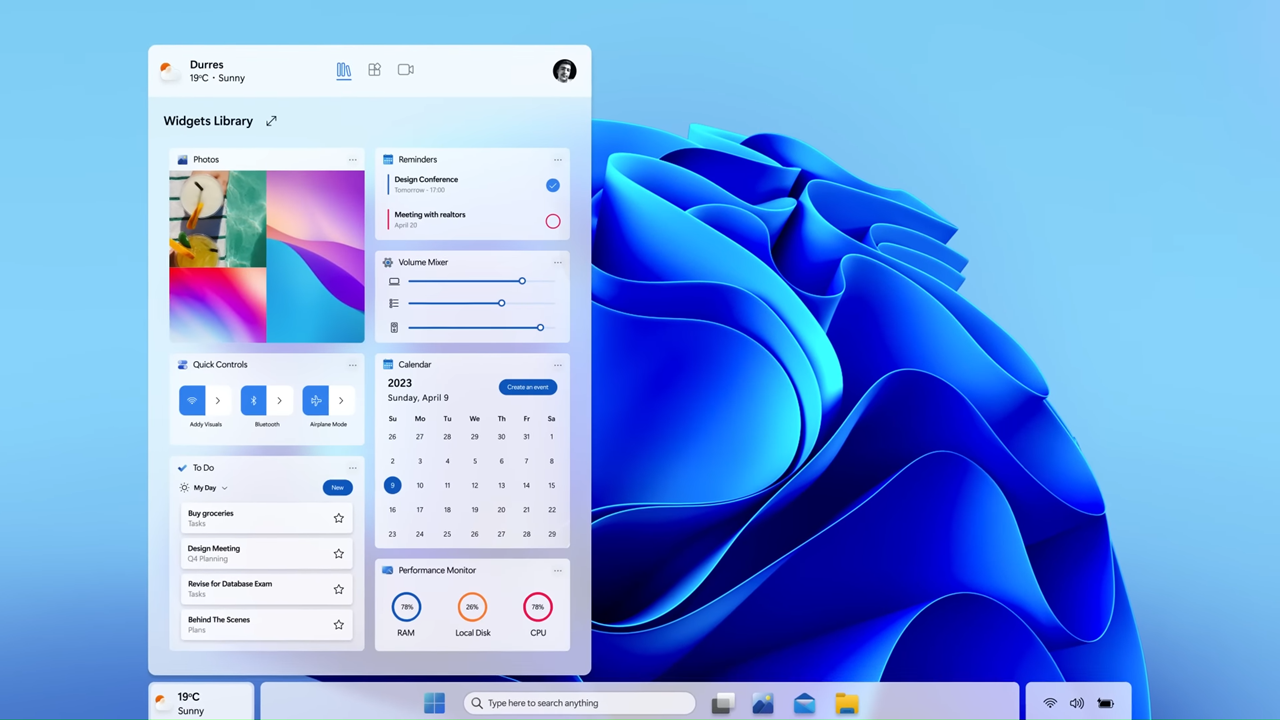
The idea of Windows 12 has been quietly building momentum for a while now. Even though Microsoft has not officially revealed everything, leaks, insider reports, and early previews are already giving us a surprisingly clear picture of what is coming next. And if these glimpses are anything to go by, Windows 12 is not just another update. It looks like a complete rethink of how the Windows experience should feel in a modern world.
If you have used Windows 10 or even Windows 11, you might remember how each version tried to modernize the interface while keeping familiar elements intact. Windows 12 appears to go further. It is shaping up to be cleaner, more adaptive, and heavily influenced by AI-driven interactions.
Let’s break down everything we know so far about Windows 12 UI leaks and what they actually mean for everyday users.
A Fresh Look That Feels Familiar

One of the most talked-about leaks shows a redesigned desktop layout that looks noticeably different from anything we have seen before. Instead of the traditional layout where everything is anchored to the bottom, Windows 12 appears to experiment with a more flexible design.
In some leaked screenshots, the taskbar is floating slightly above the bottom edge, giving the interface a lighter and more modern feel. The system tray is separated and positioned at the top corner in certain builds, which might remind some users of macOS or even ChromeOS.
At first glance, this might seem like a drastic change. But when you look closer, it is still very much Windows. The Start menu, icons, and navigation patterns are still intuitive. Microsoft seems to be walking a careful line between innovation and familiarity.
Floating Taskbar and Modular Layout
The floating taskbar is not just a visual tweak. It represents a broader shift toward modular UI design. This means different parts of the interface can move, adapt, or even disappear depending on what you are doing.
For example, when working in full-screen apps or focusing on productivity tasks, the interface may minimize distractions by hiding certain elements. On the other hand, when you are browsing or multitasking, those same elements can reappear in a more accessible way.
This kind of flexibility could make Windows feel less cluttered and more responsive to user behavior.
Smarter Widgets and AI Integration
One of the most exciting aspects of Windows 12 UI leaks is the deeper integration of AI. Widgets are expected to become far more intelligent and context-aware.
Instead of static information panels, future widgets might adapt based on your habits. For instance, if you regularly check the weather in the morning or track stock prices during work hours, the system could automatically highlight those widgets at the right time.
AI could also play a role in organizing your desktop, suggesting app layouts, or even optimizing system performance based on how you use your computer.
This is not just about convenience. It is about making the operating system feel like it understands you.
A Cleaner, Minimalist Design Language
Windows 11 introduced rounded corners, softer shadows, and a more polished design. Windows 12 seems ready to refine that approach even further.
Leaked visuals suggest:
- More transparency effects that feel subtle rather than overwhelming
- Smoother animations that make transitions feel natural
- Simplified icons with consistent styling
- Reduced visual clutter across menus and settings
The overall goal appears to be clarity. Instead of overwhelming users with too many visual elements, Windows 12 aims to present information in a calm and structured way.
This might not sound revolutionary, but in daily use, these small changes can make a big difference.
Redesigned Start Menu Experience
The Start menu has always been the heart of Windows, and it looks like Microsoft is rethinking it once again.
Early leaks suggest a more dynamic Start menu that could include:
- Personalized recommendations based on usage
- Better organization of apps and files
- Integration with cloud services for quick access
- Adaptive layout depending on screen size and device type
For users who rely heavily on the Start menu, this could make navigation faster and more intuitive.
Better Multi Device Experience
Windows 12 is expected to focus heavily on seamless experiences across devices. Whether you are switching between a laptop, tablet, or even a foldable device, the UI is rumored to adapt automatically.
This includes:
- Layout changes based on screen size
- Touch-friendly controls when needed
- Smooth transitions between keyboard and touch input
This adaptability is especially important as more users move between different types of devices throughout the day.
Enhanced Snap Layouts and Multitasking
Multitasking has always been one of Windows’ strongest features, and Windows 12 Download looks ready to take it further.
Leaked features suggest improvements like:
- More customizable snap layouts
- AI-assisted window placement
- Faster switching between tasks
- Better support for multiple monitors
Imagine opening a set of apps and having Windows automatically arrange them in the most efficient way. That is the kind of experience Microsoft seems to be aiming for.
Performance Focus Behind the Scenes
While the UI changes are getting most of the attention, there is also a strong focus on performance improvements.
Reports suggest that Windows 12 may use a more modular system architecture. This could allow for:
- Faster updates
- Better security
- Improved performance on both high-end and low-end devices
For users, this means a smoother experience without needing constant hardware upgrades.
Cloud and Web Integration
Another noticeable trend in Windows 12 leaks is deeper integration with cloud services. Microsoft appears to be pushing toward a more connected ecosystem.
This could include:
- Faster syncing of files and settings
- Better integration with Microsoft 365 apps
- Web-based features that reduce dependency on local storage
While this might raise concerns for some users, it also opens up possibilities for more flexible and accessible computing.
What These Leaks Really Mean
It is important to remember that leaks are not final. Features can change, designs can evolve, and some ideas may never make it to the final release.
However, the overall direction is clear. Microsoft is moving toward a smarter, cleaner, and more adaptive operating system.
Instead of focusing only on visual upgrades, Windows 12 seems to prioritize how users interact with their devices on a daily basis.
Should You Be Excited About Windows 12
If you enjoy trying new features and staying up to date with technology, Windows 12 is definitely something to watch. The combination of AI integration, modern design, and improved performance could make it one of the most significant Windows releases in years.
At the same time, if you prefer stability and familiarity, it might be worth waiting until the official release and early updates settle things down.
Either way, the changes coming with Windows 12 are not just cosmetic. They reflect a broader shift in how operating systems are evolving.
Final Thoughts
Windows 12 UI leaks give us an early glimpse into what could be the next big step for Microsoft’s operating system. From floating taskbars to AI-powered features, the focus is clearly on creating a more personalized and efficient experience.
What stands out the most is how these changes aim to simplify rather than complicate. The design feels intentional, the features feel practical, and the overall direction feels aligned with how people actually use their devices today.
As more details emerge, it will be interesting to see how these ideas come together in the final version. For now, one thing is clear. Windows 12 is not just about looking different. It is about working smarter in a world that expects more from every click, tap, and interaction.