Samsung has quietly transformed the way we use smartphones. What once felt like simple software upgrades now feels more like having a smart assistant living inside your device. With the latest Galaxy AI updates, Samsung is pushing its ecosystem into a new era where your phone understands context, adapts to your habits, and helps you get things done faster.
If you have used a Galaxy device recently, you might have already noticed small but meaningful changes. Messages feel smarter, photos look sharper without effort, and even simple tasks like searching or translating feel more natural. These improvements are not random. They are part of Samsung’s broader AI vision that blends on device intelligence with cloud power.
In this guide, we will walk through the most important Samsung Galaxy AI updates and features, and explain how they actually make a difference in real life.
What Is Samsung Galaxy AI
Samsung Galaxy AI is a collection of artificial intelligence features built directly into Galaxy smartphones and tablets. Unlike older features that required separate apps, Galaxy AI works across the system. It enhances communication, photography, productivity, and even battery efficiency.
The biggest shift is that many of these features now run on device. This means faster results and better privacy. At the same time, Samsung still uses cloud processing for more complex tasks when needed.
In simple terms, Galaxy AI is designed to make your phone feel less like a tool and more like a smart companion.
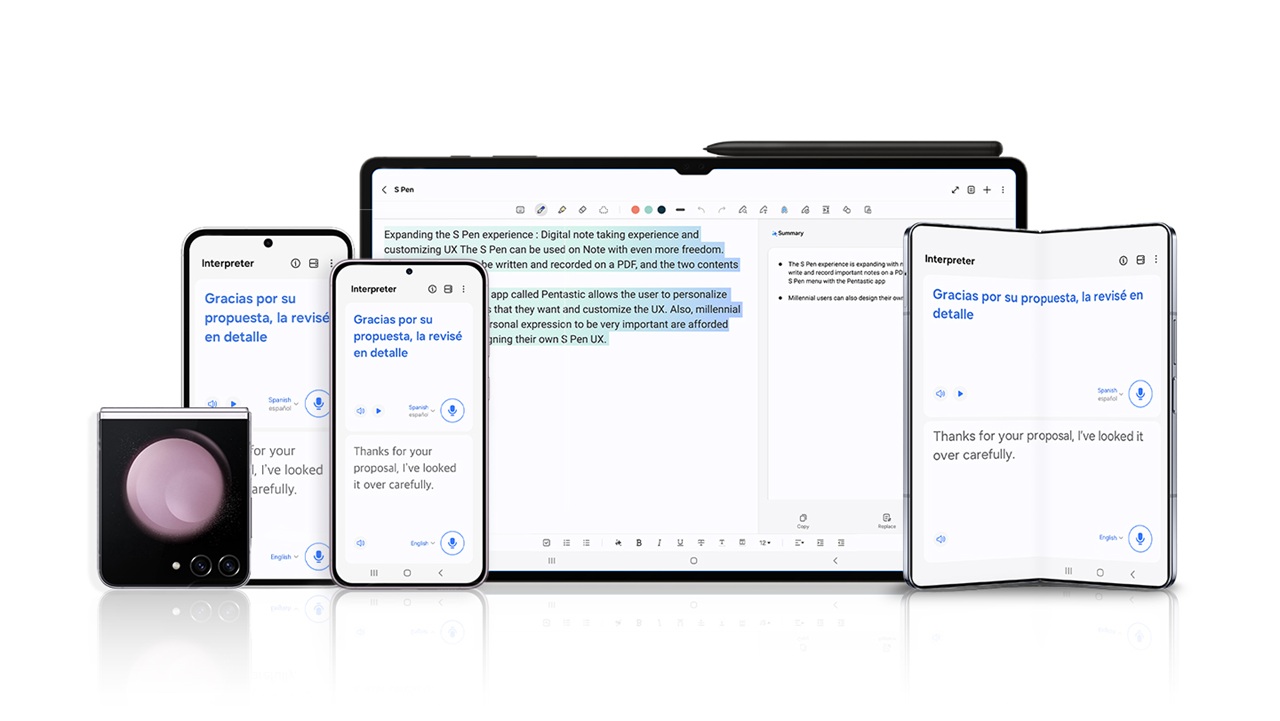
Real Time Call Translation
One of the most talked about features is Live Translate. This tool allows you to have phone calls in different languages without needing a third party app.
When you speak, your words are translated in real time for the other person. Their response is then translated back to you. Everything happens seamlessly during the call.
Imagine calling a client in another country or speaking with someone who does not share your language. Instead of struggling, your phone handles the communication.
The most impressive part is that this feature works directly within the dialer app. There is no need to switch between apps or copy text.
AI Powered Messaging Assistance
Typing messages has become much easier with Galaxy AI. The built in writing assistant can suggest replies, improve tone, and even rewrite your message in different styles.
For example, you can turn a casual message into a professional one with a single tap. This is especially useful for emails or work related chats.
Another practical feature is grammar correction. If you often send quick messages with mistakes, the AI can clean them up before sending.
It feels like having an editor inside your keyboard, but without slowing you down.
Circle to Search Feature
Samsung introduced a simple yet powerful feature called Circle to Search. Instead of typing queries, you can simply draw a circle around anything on your screen to search for it.
Let’s say you see a product in a photo or a video. Just circle it, and your phone will instantly show related results. No need to take screenshots or switch apps.
This feature saves time and feels very natural once you start using it. It changes the way people interact with search completely.
Smarter Photo Editing with AI
Photography has always been a strong point for Samsung, but AI has taken it to another level.
With Galaxy AI, you can edit photos in ways that previously required professional tools. You can remove unwanted objects, adjust backgrounds, and even reposition elements within an image.
One standout feature is Generative Edit. If you move an object in your photo, the AI can intelligently fill in the missing background. It does not look artificial or forced.
Another helpful tool is automatic enhancement. The AI analyzes lighting, contrast, and colors to improve your photos instantly.
For everyday users, this means better photos without learning complex editing skills.
AI Zoom and Night Photography
Zoom and low light photography have also improved significantly. Galaxy AI enhances details when zooming in, making distant objects appear clearer.
In night mode, AI reduces noise and improves brightness while maintaining natural colors. This is particularly useful for capturing moments in dim environments.
These improvements may seem subtle at first, but they make a big difference when you compare photos side by side.
Notes and Productivity Features
Samsung Notes has received a major upgrade with AI integration. You can now summarize long notes, organize content, and even generate formatted text automatically.
For students and professionals, this is a game changer. Instead of manually reviewing pages of notes, you can get a quick summary in seconds.
Another feature is automatic formatting. If your notes are messy, the AI can clean them up and structure them properly.
These tools save time and make it easier to stay organized.
AI in Samsung Keyboard
The Samsung Keyboard now includes several AI tools that improve everyday typing.
You can translate text in real time while typing. This is useful when chatting with someone in a different language.
There is also a tone adjustment feature. Whether you want your message to sound formal, friendly, or concise, the AI can modify it instantly.
These features may seem small, but they add up to a smoother communication experience.
Voice Recorder with Transcription
Samsung has upgraded its Voice Recorder app with AI transcription. When you record audio, the app can convert speech into text automatically.
It also identifies different speakers and labels them accordingly. This is especially helpful for meetings, interviews, or lectures.
You no longer need to manually write notes while listening. The AI does it for you.
AI Battery Optimization
Battery life is one of the most important aspects of any smartphone. Samsung uses AI to analyze your usage patterns and optimize power consumption.
Apps that you rarely use are limited in the background, while frequently used apps remain active.
Over time, your phone learns your habits and adjusts accordingly. This leads to better battery performance without requiring manual settings.
Privacy and On Device Processing
One concern many users have with AI is privacy. Samsung addresses this by processing many tasks directly on the device.
This means your data does not always need to be sent to external servers. Sensitive tasks like message suggestions or translations can happen locally.
For more complex features, cloud processing is used, but Samsung provides transparency and control over your data.
This balance between performance and privacy is an important step forward.
Integration Across Samsung Ecosystem
Galaxy AI is not limited to smartphones. It works across tablets, watches, and other Samsung devices.
For example, you can start a task on your phone and continue it on your tablet. AI helps maintain context and continuity.
This ecosystem approach makes Samsung devices feel more connected and efficient.
How Galaxy AI Helps in Daily Life
While all these features sound impressive, the real question is how they impact everyday use.
Think about small moments throughout your day. Sending messages, taking photos, searching for information, or managing tasks.
Galaxy AI simplifies each of these actions. It reduces effort, saves time, and improves results.
Instead of manually adjusting settings or switching apps, the AI handles things in the background.
Over time, this creates a smoother and more enjoyable experience.
Future of Samsung Galaxy AI
Samsung is just getting started with AI. Future updates are expected to bring even more advanced features.
We may see deeper personalization, smarter automation, and improved integration with other services.
There is also a strong focus on making AI more natural and less intrusive. The goal is to assist without overwhelming the user.
As technology evolves, Galaxy AI will likely become an essential part of the smartphone experience.
Final Thoughts
Samsung Galaxy AI updates are not just about adding new features. They represent a shift in how smartphones are designed and used.
Instead of relying on manual input, your device now understands context and adapts to your needs.
From real time translation to intelligent photo editing, these features are built to solve real problems.
If you are using a recent Galaxy device, exploring these tools can change the way you interact with your phone.
And if you are considering an upgrade, Galaxy AI is one of the strongest reasons to make the switch.
The future of smartphones is not just faster hardware or better screens. It is smarter software that works with you, not against you. Samsung is clearly moving in that direction, and Galaxy AI is proof of that.